Engineering demo Repository → Smartsheet 147 tests green

Your repo already wrote the status report. It just never told the PM.

A command-line tool that reads an existing codebase, turns the project information already hiding inside it into clean Smartsheet rows, and keeps them current. It never invents an owner, a priority or a date.

Repository Scan Extract Normalize Validate Sync Smartsheet
Open the interactive demo → Runs the real engine in your browser. No account, no token.
PROMISE 01

Only writes what the code says

Owners, priorities and dates are filled only when the code literally states them. Everything else stays blank on purpose, and a guard refuses to sync fabricated data. One deliberate exception, stated plainly: a TODO that is still in the code is recorded as Not Started, because the comment describing the work still exists. That is a documented rule rather than a fact read from the file.

PROMISE 02

Every row is traceable

Each row carries the file it came from - and the line, wherever the evidence has one - plus the evidence type and a confidence level, so a human can verify it in seconds. Repository-wide checks such as “no lockfile” cite (repository), because they are about the repo as a whole rather than one line.

PROMISE 03

Protects human work

When a person edits the sheet, the tool never silently overwrites their decision. When both sides have moved and disagree the row becomes a flagged conflict; when only the sheet's own technical baseline was stale it is repaired and the row is flagged for a person with the reason. Either way it is a flag, not a silent stomp. Nothing is ever deleted.

23
items found in the demo repo
9
evidence extractors
147
automated tests passing
0
rows deleted, ever

Explain it like I am 5

The toy-box version.

Imagine your software project is a giant toy box.

Lots of important notes are hidden inside it: little reminders to fix things, a list of what is already finished, a diary of every change.

Our program looks through the box and finds the useful notes. It does not throw anything away, and it does not move anything. It only reads.

Then it writes neat copies of those notes onto a big checklist that the whole team can see. That checklist is Smartsheet.

When something in the toy box changes, the program checks again and updates the checklist on the same line instead of adding another one. Run it twice at once and it can still double up, so it is meant to be run one at a time.

And if the program is not sure about something, it does not guess. It puts a little flag on it and asks a grown-up to look.
The problem

The information exists. Nobody has time to go get it.

A software project already records what is happening, in a dozen scattered places: TODO and FIXME comments, README roadmaps, changelogs, CI files, package manifests, ownership files, decision records. A project manager should not have to open twelve files to answer one question. This tool reads all of them and puts organized copies into one sheet, so the sheet stays honest with almost no manual upkeep.

The core discipline

What it reads — and what it refuses to guess.

Accuracy beats a full sheet. These two lists are the heart of the design: the tool is generous with evidence and strict about invention. The right column is what makes it safe to trust.

Reads as fact (with evidence)

  • Open work from TODO / FIXME / HACK comments, in the developer's own words
  • Done vs not-done from README checklists
  • Versions and dates from the changelog
  • Owner, but only from CODEOWNERS or a literal TODO(name)
  • Priority, but only from a literal tag like TODO(P1)
  • Decisions from ADRs, dependencies from manifests, suites from tests

Refuses to invent

  • ×Due dates — no repository states them. Always left blank.
  • ×Business priority when the code is silent (22 of 23 demo rows left blank)
  • ×An owner the code never named (7 of 23 rows left blank)
  • ×Completion percentages and made-up status
  • ×Whether tests pass — the tool never executes the target's code
  • ×Guesses go to an AI Suggestion column with a Human Review flag — never into an owner, priority or date column

Real output

Actual rows from the demo repository.

This is genuine output from “Orderly”, a small bakery order-tracking API bundled with the tool. Note the blanks the tool chose to leave, the monospace file:line source on every row that has a line, and the low-confidence risk routed to Human Review.

Orderly — Repo Intelligence  ·  23 rows  ·  3 need review
Item IDItemTypeStatusPriorityOwnerConfidenceReviewSource
RSI-TD-594c25cb9a7a sessions never expire; add a TTL and a cleanup job Bug Not Started blank @maria, @dev-lee High src/auth/session.js:5
RSI-TD-2e07fd3135a8 daily summary report for the owner Task Not Started High @maria High src/orders/service.js:22
RSI-CK-dad057ed2313 Email the customer when an order is ready (#42) Task Not Started blank @maria High README.md:16
RSI-RL-2a64fb8335cd Release 1.2.0 Release Released blank blank High CHANGELOG.md:10
RSI-AD-b9cd6e10e217 ADR-0001: Use PostgreSQL for order storage Decision Done blank @maria High docs/adr/0001-use-postgres.md
RSI-RK-01c48a243e80 Possible risk: HACK in a security-sensitive file (ORD-17) Risk Unknown blank blank Low src/payments/stripe.js:4

6 of 23 rows shown. Full sheet has 26 columns; the technical ones hide behind the main view.

Smartsheet, used properly

Not just rows in a grid. The whole toolset, wired up for you.

The rows are the start. What turns the sheet into something that runs a project is Smartsheet’s own features. All six below are configured and live in the real sheet (set up by hand from the recipes in docs/smartsheet-import.md - the tool creates the columns and rows, not the automations), not mocked up - set up so the sheet reacts, alerts and summarizes on its own, with no one babysitting it.

Column types

Dropdowns and real contacts

Type, Status, Priority and Confidence are proper single-select dropdowns, not free text. Owner is a Contact column, which is what lets Smartsheet offer it as an alert recipient at all. A Contact holds a real address only when the code stated one; a CODEOWNERS handle such as @team-b is written as a display value, and a display value cannot be emailed.

Conditional formatting

The sheet colours itself

Rows turn red when the code and a person disagree, amber when something is flagged for review, and grey when an item vanished from the code. Trouble is visible at a glance.

Saved filter

“Needs my attention”

One shared view that shows only the rows that are blocked, in conflict, or flagged for review. Everyone opens the same filter and sees exactly what is on fire.

Automations

Alerts that send themselves

Two automations built on the live sheet: when a row is flagged for review Smartsheet emails the Owner (where the code stated a real address - it cannot email a blank cell or a display-only handle), and a weekly reminder chases items with no owner at all. The tool creates the sheet and its columns; the automations are built once in Smartsheet's UI, and the import guide walks through it.

Forms and update requests

Ask the team, safely

Where the code never named an owner, Smartsheet sends an update request asking who owns this. The answer drops into the row, and the sync never overwrites it.

Dashboard and reports

Status without opening the sheet

A summary sheet of counts, built from sheet-summary formulas, feeds a dashboard and a report so leadership sees where things stand without touching a single row.

The one screen a manager opens first.

A dashboard built from cross-sheet formulas over the same sheet. It answers what needs my attention in about five seconds. These are the real counts from the demo repository.

10
Open items
6
Completed
7
Status unknown
1
High priority
3
Needs review
Items by type
Task9
Release4
Risk3
Test2
Bug1
Tech Debt1
Documentation1
Dependency1
Decision1

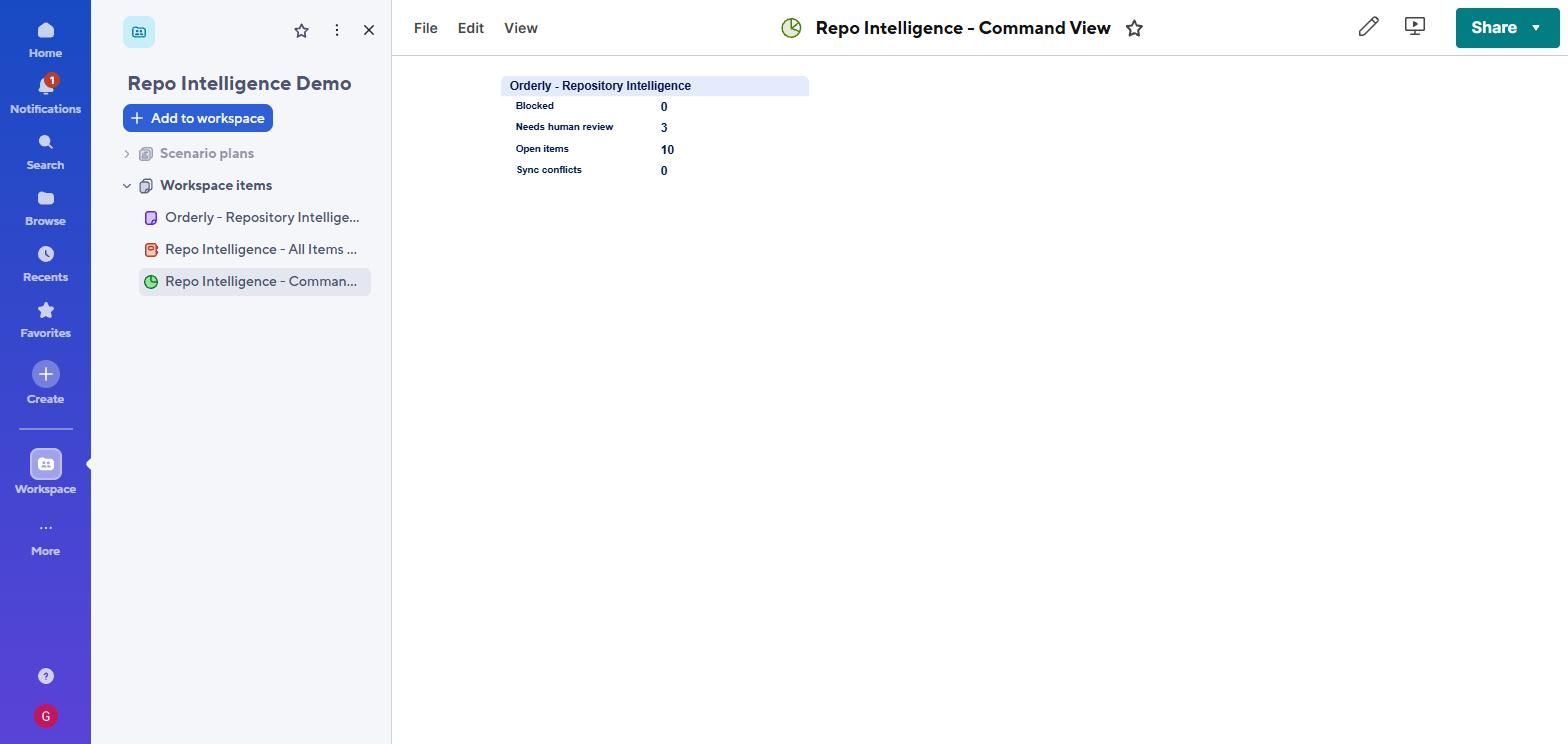
These are the live Sheet Summary values from the real sheet: Open items 10, Blocked 0, Needs human review 3, Sync conflicts 0. Built from COUNTIF formulas over the same rows. “Status unknown” is 7 on purpose - the repository never stated a status for those items, so the tool refuses to invent one rather than quietly counting them as open.

How it works

Deterministic code does the reading. The optional AI only ever suggests.

Nine small, independently tested extractors do the parsing — no language model in the path that produces facts. An optional Claude pass (off by default) writes plain-language summaries into the AI Suggestion column, and may fill an empty Description with a clearly labelled summary. It never writes to a fact column such as Owner, Status, Priority or Source.

STAGE 01

Scan

Walk the repo read-only. Skip vendor dirs and binaries. Withhold anything that looks like a secret before any other rule.

STAGE 02

Extract

Nine parsers turn comments, checklists, changelogs, manifests, CI, tests, CODEOWNERS and ADRs into quoted evidence: whitespace collapsed, clipped to 400 characters, redacted.

STAGE 03

Normalize + validate

Evidence becomes rows with a stable ID and a confidence level. A guard rejects any invented owner, priority or date.

STAGE 04

Sync

A three-way merge creates, updates or flags rows in Smartsheet. Idempotent, batched, retry-aware. Or export a CSV.

The hard part, solved

What happens when the AI and a human both edit the same row?

This is the question that sinks most sync tools. The answer is an explicit ownership model: every column belongs to the repository, to the human, or to both under a defined conflict rule.

Repository owns

Refreshed from code

Facts the repository is the source of truth for. Overwritten whenever the code changes.

Item · Type · Component
Description · Source
Confidence · Last Repo Update
Human owns

Never overwritten

PM decisions. Seeded once on creation only if the code proves them, then left alone forever.

Priority · Owner
Due Date · Milestone
Management Notes
Shared → merged

Conflict, not stomp

If both sides change Status and disagree, the human value stays, the code's value moves to Repo Status, and the row is flagged.

Status
Human Review

Run it twice

The five-step demo, verified end to end.

Every line below is real output from rsi demo, which runs the true analyzer and sync engine against an in-memory sheet, so it needs no account and sends nothing anywhere. This is the sequence to walk through live.

1

First sync

An empty sheet. Every item found in the repository becomes a row.

23 new items will be created. 3 items require human review.
2

Run it again, nothing changed

Idempotent: the second run makes no duplicates and writes nothing.

0 new items · 0 updated · 23 unchanged
3

A developer ticks a README checkbox

The same row is updated, matched by its stable Item ID. No duplicate row appears.

1 item will be updated. UPDATE RSI-CK-dad057ed2313 Email the customer… (status Not Started → Done)
4

A PM sets it to Blocked; the developer reverts the code

Both sides changed Status and now disagree. The human's value is kept; the code's value is preserved separately; the row is flagged.

CONFLICT RSI-CK-dad057ed2313 (sheet says "Blocked", repo says "Not Started") Status=Blocked · Repo Status=Not Started · Human Review=checked
5

The FIXME comment is deleted from the code

The tool cannot know if it was fixed or just removed, so it keeps the row and asks a human. Nothing is deleted.

2 rows no longer found in the repository (kept, flagged). MISSING RSI-TD-594c25cb9a7a sessions never expire… Final sheet: 23 rows, 0 deleted.

Live build · 26 August 2026

This is not a mockup. Here is the real sheet.

23 rows and 22 typed columns generated from the sample repository and imported into a real Smartsheet, then the surrounding toolset built on top: summary formulas, conditional formatting, a shared filter, a grouped report, a dashboard and two automations.

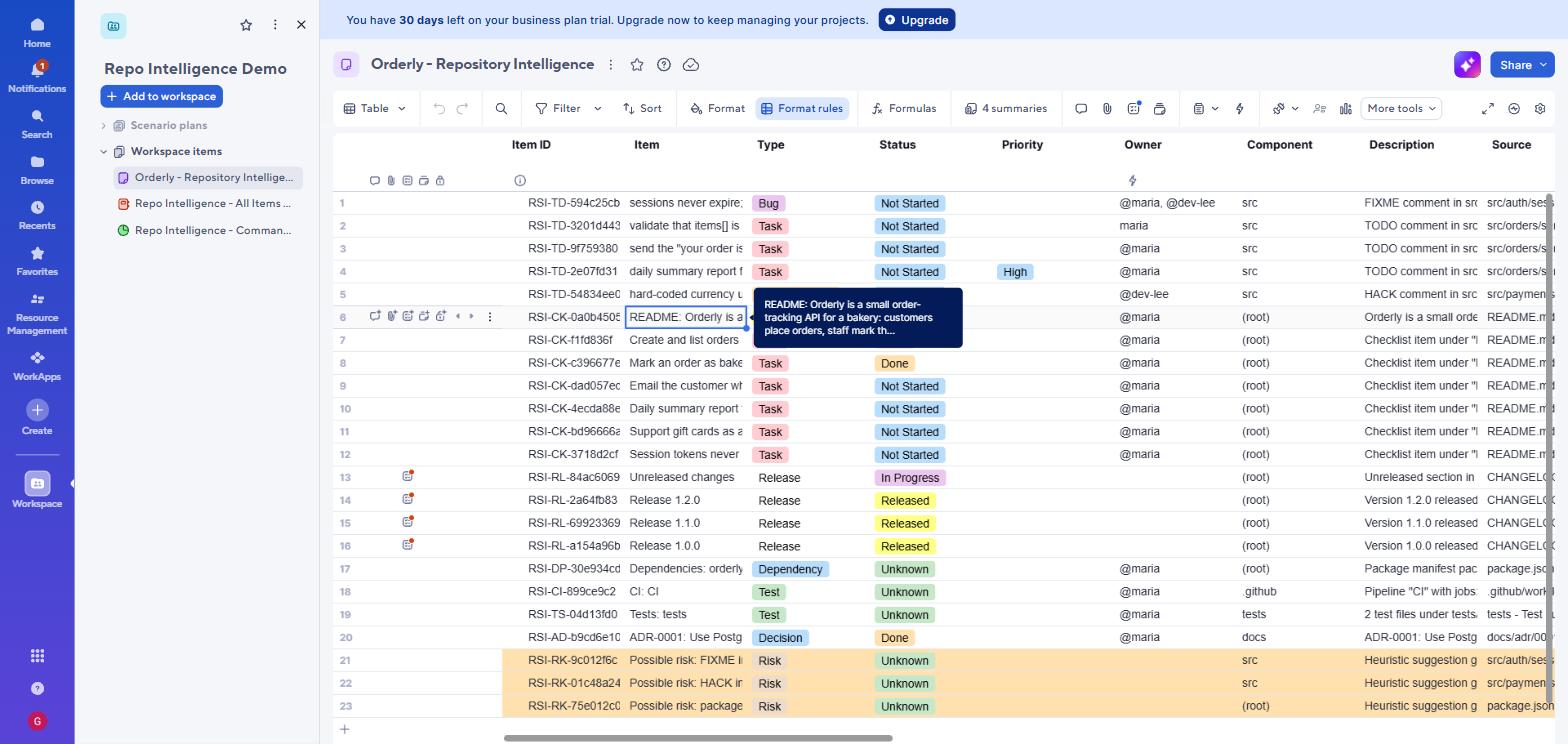
The live Smartsheet: 23 rows with Type and Status dropdown pills, Owner contacts, and rows 21-23 highlighted amber by conditional formatting
Type and Status render as real dropdown pills; Owner holds real contacts; rows 21–23 are amber because a conditional-formatting rule fires on Confidence = Low. The toolbar shows 4 summaries and active Format rules.
Smartsheet dashboard with a metric widget bound to sheet summary fields showing Blocked 0, Needs human review 3, Open items 10, Sync conflicts 0
A Metric widget bound to Sheet Summary data — so the chain runs repository → sheet → summary formula → executive number, with every figure traceable to rows a person can open.
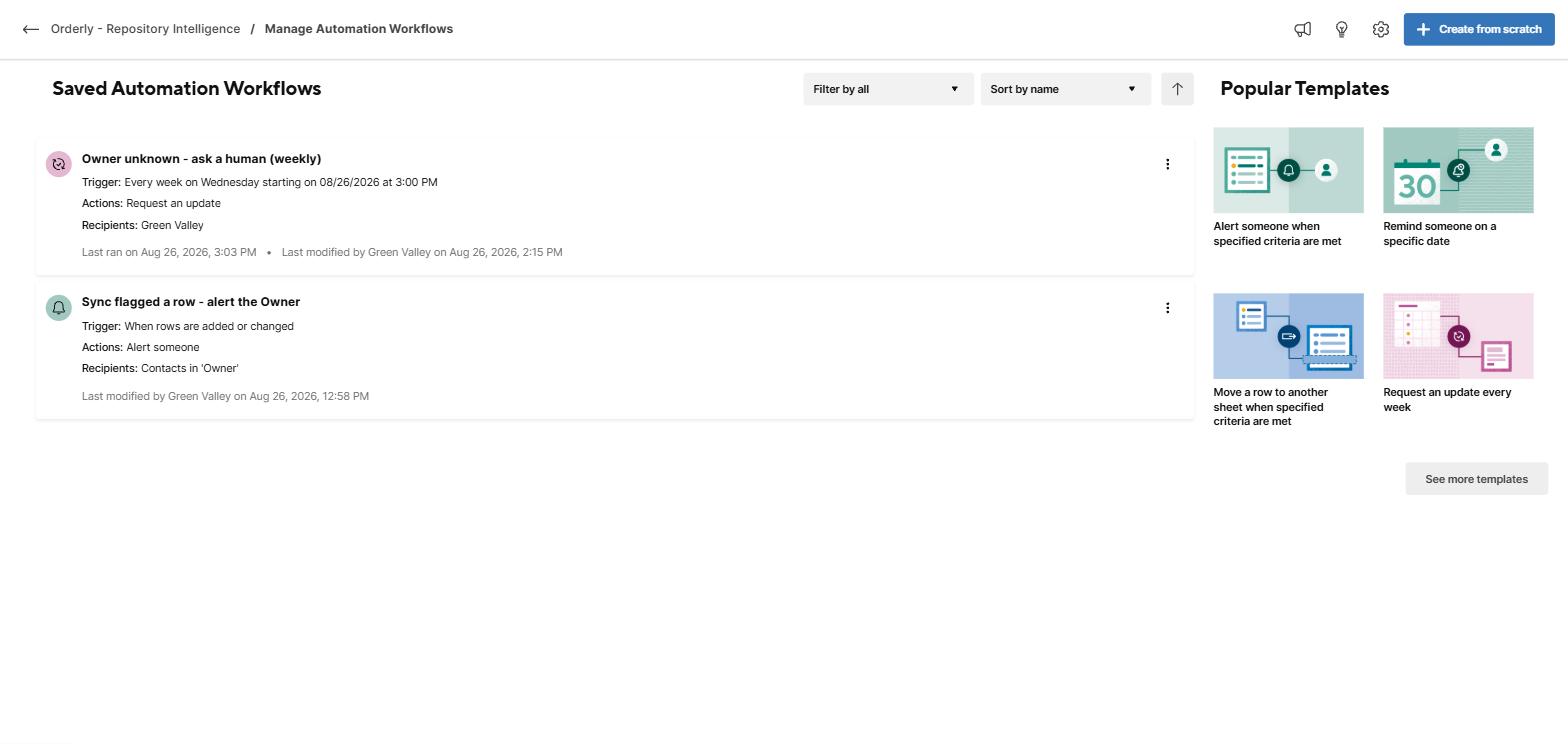
Two saved Smartsheet automation workflows: one alerting contacts in the Owner column, one sending a weekly update request where Owner is blank
Two live workflows. The alert sends to contacts in the Owner cell — only possible because Owner is a Contact column, not text. The second fires weekly where Owner is blank, which is exactly 7 of 23 rows: the tool refuses to guess an owner, so Smartsheet asks a human instead. It has already run once.

Honest status

Built and verified — and what is left.

Every feature described above is built, 147 automated tests cover it against a fake fetch, and the sheet, dashboard and automations shown here are a real Smartsheet account, built from the tool's own CSV export. One thing is still deliberately not claimed as done: the live write over the REST API, because Smartsheet gates API tokens behind the Business plan and the 30-day trial cannot issue one. The sheet below was populated through Smartsheet’s own CSV import instead.

Built, with tests

  • 9 extractors, normalizer, no-fabrication guard
  • Idempotent three-way sync with conflict handling, exercised against an in-memory sheet
  • Smartsheet REST client: retry, backoff, 429 handling, batching
  • CSV fallback for teams without API access
  • Dry-run mode that writes nothing
  • Secret filtering and read-only guarantee
  • 147 automated tests passing; typecheck clean
  • ELI5 guide, technical docs, data mapping, demo script
  • Run against a live Smartsheet: 23 rows, 22 typed columns, plus summary formulas, conditional formatting, a shared filter, a grouped report, a dashboard and two automations
  • Two defects found by running it - a CRLF scanner bug and a UTF-8 BOM export bug - both fixed and regression-tested

Try it in three commands

# from the app/ folder
npm install
npm test                 # 147 passing
npm run demo:walkthrough   # the full storyline, no account needed

# when you have a Smartsheet token in .env:
npx rsi setup-sheet     # create the sheet with all columns
npx rsi sync --dry-run  # preview every change, write nothing
npx rsi sync